
10 Essential Digital Workplace Tools for Modern Enterprises in 2026
The modern enterprise landscape has fundamentally transformed. Remote work is no longer a temporary solution—it’s a permanent fixture of business operations worldwide. As organizations navigate this shift, the demand for robust digital workplace tools has skyrocketed, creating both opportunities and challenges for business leaders.
According to recent industry research, 74% of companies plan to maintain hybrid work models through 2026 and beyond. This seismic shift means that enterprises can no longer rely on traditional office-centric workflows. Instead, they need integrated digital ecosystems that enable seamless collaboration, productivity, and communication across distributed teams.
The challenge? With thousands of digital workplace tools flooding the market, choosing the right technology stack has become increasingly complex. Organizations that invest wisely gain competitive advantages in talent retention, operational efficiency, and innovation velocity. Those that don’t risk falling behind competitors who leverage technology more strategically.
This comprehensive guide explores ten essential digital workplace tools that modern enterprises need in 2026, helping you build a future-ready digital infrastructure that drives real business results.
Global Market Trends in Digital Workplace Tools
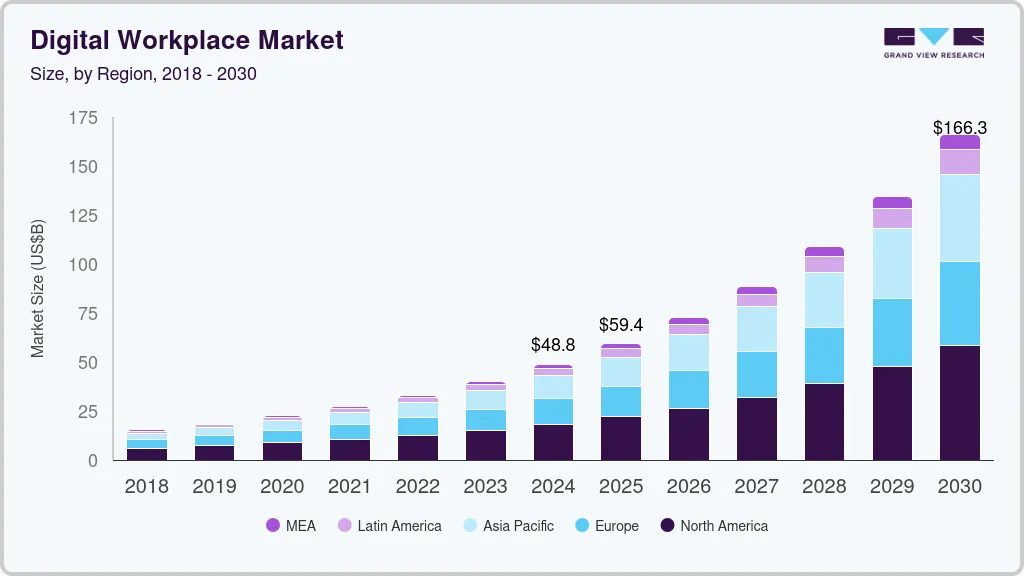
The digital workplace tools market continues expanding rapidly, driven by permanent hybrid work adoption and accelerating digital transformation initiatives.
Market analysts project the global digital workplace market will reach $87.5 billion by 2028, growing at a compound annual rate of 21.3%. This growth reflects several key trends:
AI integration is transforming every category of digital workplace tools. Generative AI assists with content creation, summarization, and analysis. Predictive AI helps schedule meetings, prioritize tasks, and surface relevant information proactively.
Platform consolidation continues as vendors expand beyond core offerings. Communication platforms add project management features. Project management tools incorporate messaging. Organizations increasingly prefer integrated suites over best-of-breed point solutions to reduce complexity.
Employee experience focus shifts from purely functional tools to solutions that enhance workplace satisfaction. Digital workplace platforms now emphasize intuitive design, personalization, and features that support work-life balance.
Mobile-first design becomes mandatory rather than optional. With 72% of knowledge workers using mobile devices for primary work tasks, digital workplace tools must deliver full functionality on smartphones and tablets.
Industry-specific solutions emerge as vendors recognize that healthcare, financial services, and manufacturing have unique requirements. Specialized digital workplace tools addressing regulatory compliance and industry workflows gain market share.
What Are Digital Workplace Tools?
Digital workplace tools are software development applications, and platforms enable employees to collaborate, communicate, and complete work tasks in virtual or hybrid environments. These tools replace or augment traditional office functions—from face-to-face meetings to paper-based processes—with digital alternatives that work across locations and devices.
The best digital workplace tools share several characteristics:
- Cloud-based accessibility from any device or location
- Seamless integration with existing business systems
- User-friendly interfaces that require minimal training
- Enterprise-grade security and compliance features
- Scalability to grow with organizational needs
Leading enterprises now view these tools not as isolated applications but as interconnected components of a comprehensive digital workplace strategy.
Also Read: What Is Adaptive Software Development and Why It Matters Today
Why Digital Workplace Tools Matter in 2026
The business case for investing in digital workplace tools has never been stronger. Organizations that implement the right technology stack report measurable improvements across multiple dimensions.
Productivity gains top the list of benefits. Research indicates that well-integrated digital workplace solutions can boost employee productivity by 20-25% through reduced friction, automated workflows, and better information access.
Talent retention and attraction represent another critical advantage. 83% of job seekers now consider workplace technology quality when evaluating potential employers. Modern digital workplace tools signal to prospective employees that an organization values innovation and employee experience.
Cost efficiency emerges as organizations reduce real estate footprints and travel expenses. Companies implementing comprehensive digital workplace strategies report average cost savings of 15-30% annually compared to traditional office-based operations.
Business continuity has become non-negotiable. The past few years demonstrated that organizations with mature digital workplace capabilities could adapt quickly to disruptions, while those relying on physical presence struggled significantly.
1. Unified Communication Platforms
Modern enterprises need communication tools that go beyond basic messaging. Unified communication platforms integrate voice, video, chat, and screen sharing into a single, cohesive experiences.
Microsoft Teams and Slack lead this category, each offering distinct advantages. Teams excels in organizations already invested in the Microsoft ecosystem, providing deep integration with Office 365 applications. Slack offers superior user experience and extensive third-party integrations for companies prioritizing flexibility.
Key capabilities to prioritize include:
- HD video conferencing with recording capabilities
- Threaded conversations for organized discussions
- File sharing and collaborative document editing
- Integration with project management and CRM systems
- Mobile apps with full feature parity
Implementation tip: Start with a pilot program in one department before enterprise-wide rollout. Gather feedback, refine workflows, and create internal champions who can drive adoption across the organization.
2. Project Management Software
As teams become more distributed, visibility into project status and resource allocation becomes critical. Project management tools serve as the operational backbone of digital workplaces.
Asana, Monday.com, and Jira represent the market leaders, each serving different organizational needs. Asana offers intuitive interfaces for cross-functional teams, Monday.com provides extensive customization for diverse workflows, and Jira remains the gold standard for software development teams.
Essential features include:
- Visual project timelines and Gantt charts
- Task dependencies and resource allocation
- Customizable workflows and automation rules
- Real-time progress tracking and reporting
- Time tracking and budget management
Organizations implementing project management software report 28% improvement in on-time project delivery and 32% better resource utilization, according to industry benchmarks.
3. Cloud Storage and File Collaboration
The death of email attachments has arrived. Modern digital workplace tools for file management enable real-time collaboration on documents, eliminating version control nightmares and storage limitations.
Google Workspace and Microsoft 365 dominate this space, offering comprehensive suites that include storage, document creation, and collaboration features. Dropbox Business and Box provide specialized solutions for organizations requiring advanced security or industry-specific compliance.
Critical considerations include:
- Storage capacity that scales with organizational growth
- Version history and rollback capabilities
- Granular permission controls and access management
- Offline access for mobile workers
- Advanced search functionality across all file types
Security remains paramount. Ensure any cloud storage solution offers encryption at rest and in transit, multi-factor authentication, and detailed audit logs that meet regulatory requirements.
4. Employee Engagement Platforms
Maintaining company culture and employee connection in distributed environments requires dedicated tools. Employee engagement platforms help organizations measure, understand, and improve workplace satisfaction.
Culture Amp, 15Five, and Peakon provide sophisticated solutions combining pulse surveys, performance management, and analytics. These platforms help HR teams identify engagement issues before they escalate into retention problems.
Key functionality includes:
- Regular pulse surveys with benchmarking data
- Anonymous feedback channels
- Recognition and rewards programs
- Performance review workflows
- Actionable analytics and trend identification
Companies using employee engagement platforms see 21% lower turnover rates and 17% higher productivity compared to those relying on annual surveys alone.
5. Virtual Whiteboarding Tools
Creative collaboration and brainstorming need dedicated spaces in digital environments. Virtual whiteboarding tools replicate and enhance the collaborative energy of physical whiteboard sessions.
Miro and Mural lead this category, offering infinite canvases where teams can ideate, plan, and problem-solve together. These platforms support sticky notes, diagrams, wireframes, and real-time multi-user editing.
Use cases span departments:
- Product teams conducting design sprints
- Marketing teams developing campaign strategies
- Engineering teams architecting system designs
- Executive teams facilitating strategic planning sessions
- HR teams running remote workshops and training
The best virtual whiteboarding solutions integrate with other digital workplace tools, allowing teams to pull in content from project management systems, embed documents, and export outputs to various formats.
6. Knowledge Management Systems
Organizational knowledge becomes increasingly fragmented as teams distribute. Knowledge management systems create centralized repositories where employees can find information, documentation, and institutional expertise.
Notion, Confluence, and Guru offer different approaches to knowledge management. Notion provides flexible, database-driven documentation. Confluence integrates tightly with Atlassian’s ecosystem. Guru uses AI to surface relevant information within existing workflows.
Essential capabilities include:
- Powerful search across all content types
- Version control and change tracking
- Content templates for consistency
- Permission-based access controls
- Integration with communication platforms
Organizations implementing comprehensive knowledge management report 35% reduction in time spent searching for information and 40% faster onboarding for new employees.
7. Time Tracking and Productivity Analytics
Understanding how distributed teams spend time helps optimize workflows and identify bottlenecks. Time tracking tools provide insights without creating surveillance concerns when implemented thoughtfully.
Toggl Track, Harvest, and RescueTime offer varying levels of automation and detail. Toggl provides simple, manual time tracking. Harvest combines time tracking with invoicing for professional services firms. RescueTime automatically categorizes application and website usage.
Implementation requires transparent communication about purpose and usage:
- Focus on workflow optimization, not employee monitoring
- Aggregate data at team level rather than individual surveillance
- Use insights to remove obstacles and improve processes
- Respect employee privacy and work-life boundaries
When positioned correctly, productivity analytics help organizations identify meetings that could be emails, optimize resource allocation, and recognize burnout risks before they impact performance.
8. Digital Signature and Document Workflow
Remote work makes wet signatures and paper-based approvals obsolete. Digital signature tools accelerate contract execution, approvals, and compliance documentation while maintaining legal validity.
DocuSign dominates the enterprise market with comprehensive features and global legal compliance. Adobe Sign integrates seamlessly with PDF workflows. PandaDoc combines signatures with document analytics and CRM integration.
Key benefits include:
- 80% faster contract completion compared to paper processes
- Legally binding signatures in over 180 countries
- Audit trails for compliance and legal discovery
- Mobile signing capabilities for field teams
- Template libraries for common document types
Industries with high-volume signing needs—real estate, financial services, legal—see ROI within months of implementation through reduced cycle times and operational costs.
9. IT Service Management (ITSM) Tools
As digital workplace tools proliferate, IT teams need systems to manage support requests, asset tracking, and service delivery. ITSM platforms provide structure and automation for technology support.
ServiceNow, Freshservice, and Jira Service Management offer enterprise-grade solutions. ServiceNow provides the most comprehensive feature set for large organizations. Freshservice offers user-friendly interfaces at mid-market price points. Jira Service Management integrates with development workflows.
Critical capabilities include:
- Self-service portals reducing ticket volume
- AI-powered chatbots for common issues
- Asset and license management
- Change management workflows
- SLA tracking and reporting
Organizations with mature ITSM practices resolve 60% of issues through self-service and automation, freeing IT teams to focus on strategic initiatives rather than repetitive support tasks.
10. Cybersecurity and Access Management
Distributed workforces expand attack surfaces exponentially. Cybersecurity tools protecting digital workplaces must secure devices, networks, and data across locations.
Zero-trust security models have become standard for modern enterprises. Solutions like Okta, Azure AD, and Google Workspace provide identity and access management (IAM) that verifies users and devices continuously rather than assuming internal network security.
Essential security components include:
- Multi-factor authentication (MFA) for all systems
- Single sign-on (SSO) reducing password sprawl
- Mobile device management (MDM) for corporate devices
- Virtual private networks (VPN) or zero-trust network access
- Security awareness training integrated into workflows
Data breaches cost enterprises an average of $4.45 million globally. Investing in robust cybersecurity as part of your digital workplace tools strategy isn’t optional—it’s fundamental to business continuity.
How to Choose the Right Digital Workplace Tools
Selecting digital workplace tools requires strategic evaluation beyond feature checklists. Consider these critical factors:
Integration capability often matters more than individual tool features. Tools that don’t integrate create information silos and workflow friction. Prioritize platforms with robust APIs and pre-built connectors to your existing technology stack.
User adoption potential determines ROI more than technical specifications. The most powerful tool delivers zero value if employees won’t use it. Involve end users in evaluation, prioritize intuitive interfaces, and plan comprehensive change management.
Scalability and flexibility ensure tools grow with organizational needs. Evaluate pricing models, user limits, storage capacity, and feature availability across tiers. Avoid solutions that require expensive migrations as you scale.
Vendor stability and roadmap matter for long-term investments. Research vendor financial health, customer retention rates, and product development velocity. Platforms from established vendors or well-funded startups typically offer more sustainable partnerships.
Security and compliance must meet industry requirements. Verify certifications (SOC 2, ISO 27001, GDPR compliance), data residency options, and security features before committing to any digital workplace tools.
Implementation Best Practices
Successful digital workplace tools deployment requires more than software installation. Follow these proven practices:
Start with strategy, not tools. Define business objectives, identify pain points, and map desired workflows before evaluating specific solutions. Technology should serve strategy, not drive it.
Pilot before full rollout. Test tools with representative user groups, gather feedback, and refine configurations before enterprise-wide deployment. Pilot programs identify issues early when they’re easier and cheaper to fix.
Invest in change management. Technical implementation represents only 30% of digital workplace success. Training, communication, executive sponsorship, and ongoing support determine adoption and ROI.
Measure and optimize continuously. Define success metrics before implementation, track them consistently, and use data to optimize configurations and workflows. Digital workplace transformation is ongoing, not a one-time project.
Frequently Asked Questions
What are the most important digital workplace tools for small businesses versus enterprises?
Small businesses typically prioritize unified communication platforms, cloud storage, and basic project management as their foundation. These tools deliver immediate productivity benefits with minimal implementation complexity. Enterprises require these same foundations but must add sophisticated layers including ITSM, advanced security, enterprise-grade knowledge management, and tools that support complex organizational structures. The key difference lies in integration requirements, security needs, and scalability. Small businesses can often succeed with consumer-grade or basic business tiers, while enterprises need platforms with advanced admin controls, compliance features, and dedicated support.
How much should organizations budget for digital workplace tools?
Digital workplace technology spending typically ranges from $300-$800 per employee annually for comprehensive toolsets, though this varies significantly by industry and organizational maturity. This estimate includes communication platforms, collaboration suites, project management, security tools, and specialized applications. Organizations just beginning digital transformation often start at the lower end and increase investment as they identify value and expand capabilities. Enterprise agreements and volume licensing can reduce per-user costs significantly. Beyond licensing costs, budget for implementation services, training, and ongoing administration—often 30-50% of software costs in the first year, declining to 15-20% in subsequent years.
Can digital workplace tools actually replace physical offices?
Digital workplace tools can replicate most functional aspects of physical offices—communication, collaboration, document sharing, and project management. However, they complement rather than completely replace physical spaces for most organizations. Hybrid models that combine digital tools with periodic in-person interaction currently deliver optimal results. Certain activities including deep relationship building, creative brainstorming, onboarding, and company culture development benefit significantly from face-to-face interaction. The most successful organizations use digital workplace tools to make physical presence optional rather than mandatory, giving employees flexibility while maintaining spaces for high-value in-person activities.
How do we ensure employee adoption of new digital workplace tools?
Employee adoption requires a multi-faceted approach starting before tool selection. Involve end users in the evaluation process to build ownership and ensure solutions address real needs. Provide role-specific training that demonstrates value for each user group rather than generic feature overviews. Identify and empower internal champions who advocate for tools and assist peers. Create easily accessible support resources including video tutorials, quick reference guides, and responsive help channels. Celebrate early wins and share success stories demonstrating tool impact. Most importantly, ensure leadership models desired behaviors—employees adopt tools their managers actively use. Sustained adoption typically takes 3-6 months with consistent support and reinforcement.
What security risks should we consider when implementing digital workplace tools?
Key security risks include unauthorized access through weak authentication, data exposure through misconfigured permissions, compliance violations when tools don’t meet regulatory requirements, shadow IT where employees adopt unapproved tools, and integration vulnerabilities where connected systems create attack surfaces. Mitigate these through multi-factor authentication, regular access reviews, data classification and protection policies, approved tool catalogs with vetting processes, and security assessments of all integrations. Employee security training addressing phishing, social engineering, and safe data handling practices remains critical since human error causes most breaches. Work closely with IT security teams throughout tool evaluation and implementation to address risks before they materialize rather than responding to incidents after they occur.
Conclusion: Building Your Digital Workplace Strategy
The digital workplace tools landscape in 2026 offers unprecedented opportunities for organizations willing to invest strategically. The ten categories outlined here form the foundation of modern enterprise operations, enabling distributed teams to collaborate effectively, maintain productivity, and drive innovation.
Success requires more than assembling best-in-class tools. Truly effective digital workplaces emerge from thoughtful integration, change management, and ongoing optimization that evolves with organizational needs and employee feedback.
Start by assessing current capabilities and identifying the biggest pain points limiting your team’s effectiveness. Prioritize tools addressing these challenges while ensuring they integrate with existing systems. Remember that digital workplace transformation is a journey, not a destination—begin with core capabilities and expand strategically over time.
The enterprises that thrive in coming years will be those that view digital workplace tools not as technology investments but as strategic enablers of culture, productivity, and competitive advantage. The question isn’t whether to invest in digital workplace capabilities, but how quickly you can implement them to capture the significant benefits they deliver.
Keywords highlighted for link insertion:
- digital workplace tools (primary keyword – appears throughout)
- unified communication platforms
- project management software / project management tools
- cloud storage
- employee engagement platforms
- virtual whiteboarding tools
- knowledge management systems
- time tracking tools
- digital signature tools
- ITSM platforms
- cybersecurity tools
- AI integration
- hybrid work models
- remote work
- collaboration suites
- employee experience
- digital transformation
- zero-trust security
- change management
- workflow automation
